

AI Marketing Tools Checklist to Avoid Ecommerce Content Chaos
Ecommerce marketers face the challenge of creating consistent, high-quality content across multiple campaigns and platforms. Without the right AI marketing tools, content production becomes chaotic, causing delays, wasted spend, and approval bottlenecks. This guide helps ecommerce teams adopt a clear checklist for AI marketing tools that keep content workflows organized and scalable.
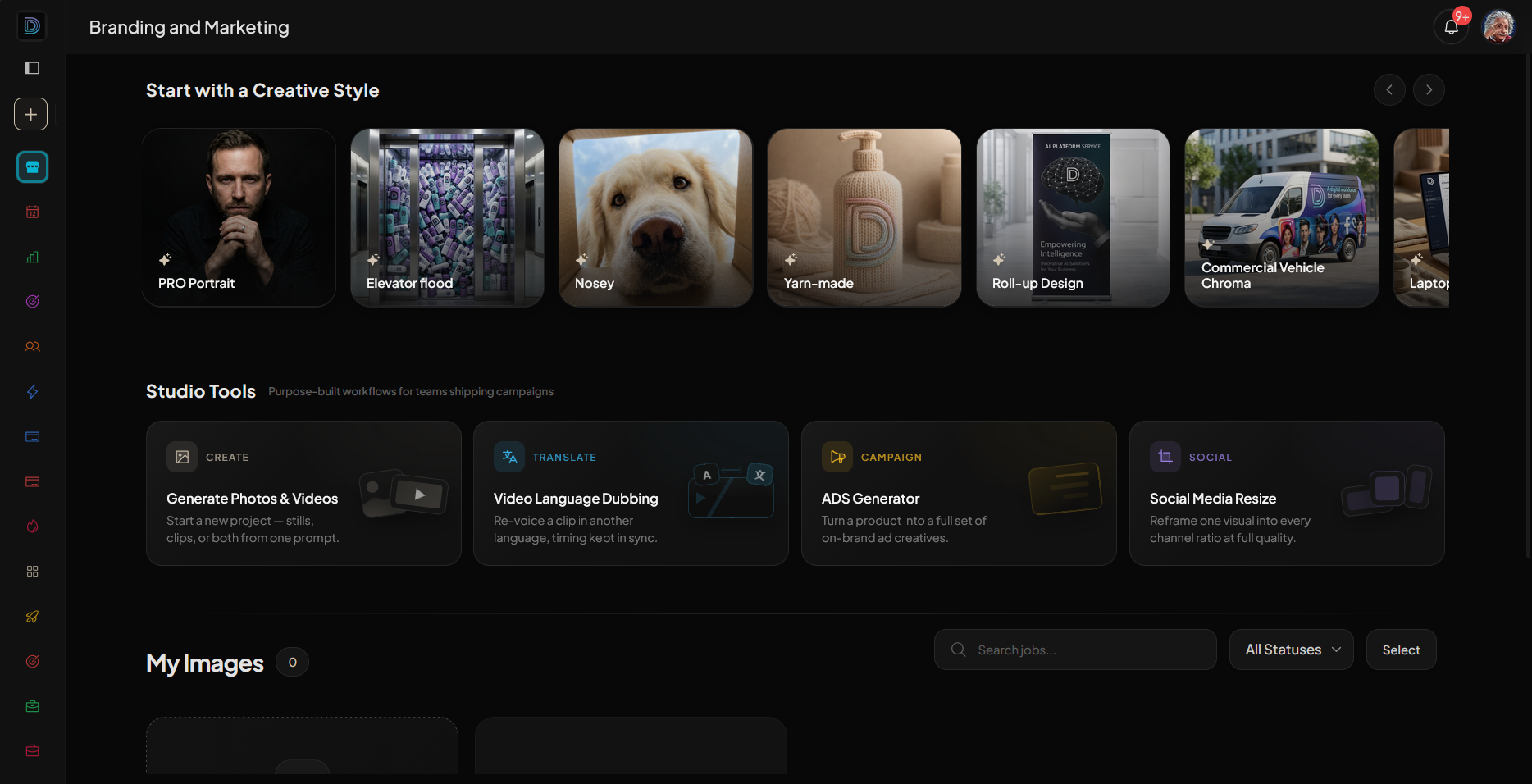
You will learn how to identify AI tools for business that truly reduce complexity, why an integrated media studio is essential, and how DIMA Media Studio empowers ecommerce marketers to produce ads, localize videos, and run campaigns without reshoots or losing control.
Key Takeaways
- Avoid content chaos by centralizing assets and campaigns within one AI marketing workspace.
- Use AI marketing tools that automate background removal, video translation, and content resizing.
- Employ UGC-style product ads to increase authenticity with less production overhead.
- Automate your ecommerce catalog integration to keep all SKUs ready for campaign styling.
- Share locked galleries for easy brand review and avoid multiple file versions scattered across platforms.
- A social pack with feed, story, and reel formats ready to download.
- New stills with different looks but the same SKU, eliminating costly reshoots.
- Product ads that read like authentic creator clips, boosting engagement.
- Video ads translated into multiple languages with lips perfectly synced.
- Avoid ecommerce content chaos by adopting an AI marketing tools checklist.
- Choose platforms like DIMA Media Studio that centralize assets, automate creation, and support campaign scale.
- Cut costs and speed time-to-market with AI-driven background removal, video translation, and UGC ad generation.
- Keep brand control with locked galleries and scheduled automated workflows.
Why Ecommerce Content Chaos Happens Without AI Marketing Tools
Many ecommerce teams rely on a fragmented mix of AI tools for business—one for video editing, another for copywriting, another for translations. This leads to duplicated work, inconsistent messaging, and endless approval rounds. Without a unified platform, marketers waste time managing files and coordinating creative assets across channels.
The root cause of content chaos is tool sprawl and lack of automation. Marketers need an AI marketing agency-level solution that organizes creative briefs, assets, and multiple versions in one place.
Checklist: Essential Features for AI Marketing Tools in Ecommerce
| Feature | Why It Matters | How DIMA Media Studio Delivers |
|---|---|---|
| Centralized Workspace | Keeps all assets and campaigns in one organized system | Single workspace with briefs, images, videos, and ads |
| Background Removal | Speeds up product photo editing for campaigns | AI-powered background removal integrated in the studio |
| Video Translation with Lip Sync | Localizes video ads without reshooting | New languages with perfect lip sync via AI translation |
| UGC-style Product Ads | Creates authentic ads that look like creator content | Automated UGC campaigns that feel native and fresh |
| Catalog Import & SKU Styling | Automates product styling and resizing across SKUs | Import shop catalog once; style and resize any SKU easily |
| Locked Galleries for Review | Share versions securely with clients for quick approval | Password-protected brand galleries within the platform |
How DIMA Media Studio Solves Ecommerce Content Challenges
DIMA Media Studio combines all critical AI marketing tools for ecommerce into one workspace designed to streamline the creative pipeline. From a single product photo or text brief, marketers can generate:
This automation drastically reduces production time, lowers costs, and prevents the scattered file chaos common in traditional workflows.
Avoid Costly Reshoots with Campaigns Without Reshoot
Reshooting products for multiple campaigns or markets increases time and budget. DIMA Media Studio’s "Campaign without a Reshoot" feature uses AI to create new stills and clips from existing product photos. The SKU remains consistent while the visual look changes to fit new campaign needs.
This approach keeps ecommerce marketing agile and responsive without sacrificing quality or brand consistency.
Automate Your Flow by Setting the Brief Once
Repetitive creative briefs drain team resources. In DIMA Media Studio, set your campaign brief once to automate ongoing asset generation. New stills, videos, and sizes automatically land on schedule, allowing marketing teams to focus on strategy and analysis instead of content firefighting.
FAQ
What are AI marketing tools for ecommerce?
AI marketing tools for ecommerce automate content creation tasks such as image editing, video localization, campaign management, and ad production to streamline marketing workflows and improve scalability.
How does DIMA Media Studio help ecommerce marketers?
DIMA Media Studio centralizes creative assets, automates background removal, video translation, and ad generation, enabling ecommerce teams to produce high-quality content faster and more consistently.
Can I use free AI tools with DIMA Media Studio?
While DIMA Media Studio offers advanced paid features optimized for ecommerce, you can integrate certain free AI tools for specific tasks, but the platform’s value lies in its all-in-one automation and organization.
What is UGC-style advertising?
UGC-style advertising mimics user-generated content, making ads feel authentic and relatable, which typically increases engagement and trust with ecommerce audiences.
How does video translation with lip sync work?
AI analyzes the original video’s speech and animates the lips in the translated version to match new language audio, maintaining natural visual flow without reshooting.
Conclusion
Ready to streamline your ecommerce marketing with one powerful AI workspace? Try DIMA Media Studio today and transform your content chaos into creative clarity.
 DIMA
DIMA